
Survival prediction with cancer WSIs#
In this tutorial, you will be introduced to building survival prediction models using both machine learning and deep learning approaches with WSIs.
We will use a subset of WSIs from TCGA-READ for illustration purposes only. The provided code and analyses are intended solely as a demonstration of workflow and usage. The results shown here are not validated and should not be used for drawing biological or clinical conclusions.
from huggingface_hub import hf_hub_download

metadata = hf_hub_download(
    "rendeirolab/lazyslide-data",
    "TCGA_READ_survival.csv",
    repo_type="dataset",
    local_dir=".",
)
import pandas as pd

metadata = pd.read_csv(metadata)
metadata.head(5)
| PATIENT_ID | AGE | AJCC_STAGING_EDITION | BIOPSY_SITE | DAYS_LAST_FOLLOWUP | DAYS_TO_BIRTH | DAYS_TO_DEATH | DISEASE_TYPE | ETHNICITY | ICD_10 | ... | SEX | VITAL_STATUS | YEAR_OF_DIAGNOSIS | OS_STATUS | OS_MONTHS | PROJECT_ID | PROJECT_NAME | PROJECT_STATE | FILE_ID | FILE_NAME | |
|---|---|---|---|---|---|---|---|---|---|---|---|---|---|---|---|---|---|---|---|---|---|
| 0 | TCGA-AG-3601 | 68.0 | 6th | Rectum | 0.0 | -24837.0 | NaN | Rectal Adenocarcinoma | NaN | C19 | ... | Male | Alive | 2007.0 | 0:LIVING | 0.000000 | TCGA-READ | Rectal Adenocarcinoma | released | d76f3d2c-f30d-4592-a51d-620e17419222 | TCGA-AG-3601-01Z-00-DX1.30ac783e-ba70-49ef-8be... |
| 1 | TCGA-AF-6136 | 72.0 | 7th | Rectum | 232.0 | -26490.0 | NaN | Rectal Adenocarcinoma | NOT HISPANIC OR LATINO | C19 | ... | Female | Alive | 2011.0 | 0:LIVING | 24.342970 | TCGA-READ | Rectal Adenocarcinoma | released | ec1f9ff4-f634-42fb-9c64-dee4950df4df | TCGA-AF-6136-01Z-00-DX1.a0e22964-b7b4-43ba-bfa... |
| 2 | TCGA-AH-6549 | 66.0 | 7th | Rectum | 6.0 | -24337.0 | NaN | Rectal Adenocarcinoma | NaN | C20 | ... | Male | Alive | 2010.0 | 0:LIVING | 17.477004 | TCGA-READ | Rectal Adenocarcinoma | released | 1f07b827-255a-4d32-9eea-f2daff7bd937 | TCGA-AH-6549-01Z-00-DX1.38ea40f7-4ebf-49cc-801... |
| 3 | TCGA-AG-A01Y | 49.0 | 5th | Rectum | 0.0 | -18112.0 | NaN | Rectal Adenocarcinoma | NaN | C20 | ... | Female | Alive | 2004.0 | 0:LIVING | 0.000000 | TCGA-READ | Rectal Adenocarcinoma | released | b7c07212-1bc0-48b3-8b69-6adffa0fb08f | TCGA-AG-A01Y-01Z-00-DX1.3F49940B-3758-419B-89C... |
| 4 | TCGA-AG-3883 | 69.0 | 6th | Rectum | 31.0 | -25415.0 | NaN | Rectal Adenocarcinoma | NaN | C20 | ... | Male | Alive | 2008.0 | 0:LIVING | 1.018397 | TCGA-READ | Rectal Adenocarcinoma | released | 2d8f32f9-bb04-46cd-8d63-91b591e9b8b3 | TCGA-AG-3883-01Z-00-DX1.2a21ffb1-8a60-4424-b74... |
5 rows × 31 columns
To get all svs files, run the following code:
slides = snapshot_download(
    "rendeirolab/lazyslide-data",
    repo_type="dataset",
    local_dir="tcga_read",
    allow_patterns=["tcga_read/*.svs"],
)
Now let’s run feature extration on these slides, you can parallel it however you want depends on your infrastructure setup, here is a demo code to parallel across GPU nodes with SLURM.
from dask.distributed import Client
from dask_jobqueue import SLURMCluster

def wsi_feature_extraction(slide):

    from wsidata import open_wsi
    import lazyslide as zs

    wsi = open_wsi(s, attach_thumbnail=False)
    zs.pp.find_tissues(wsi)
    zs.pp.tile_tissues(wsi, 448, mpp=0.5, background_fraction=0.5)

    zs.tl.feature_extraction(wsi, "titan", pbar=False)
    zs.tl.feature_aggregation(wsi, "titan", encoder="titan")
    wsi.write()

cluster = SLURMCluster(
    queue="gpu",
    cores=8,
    processes=1,
    memory="10 GB",
    job_extra_directives=[
        "-q gpu",
        "--gres=gpu:h100pcie:1",
        "--time=1:00:00",
    ],
    worker_extra_args=["--resources GPU=1"],
    log_directory="./dask-logs",
)

client = Client(cluster)
cluster.scale(10)  # Get 10 workers, each with one H100 to run

futures = [
    client.submit(wsi_feature_extraction, f"slides/{slide}", resources={"GPU": 1})
    for slide in matadata["FILE_NAME"]
]
When you finished with the processing, you can aggregate the slide features with
from wsidata import agg_wsi

matadata["slide_path"] = [f"tcga_read/{s}" for s in matadata["FILE_NAME"]]
adata = agg_wsi(matadata, wsi_col="slide_path", feature_key="titan")
We prepared a pre-computed features matrix if you don’t want to run the feature extration.
import anndata as ad

titan_features = hf_hub_download(
    "rendeirolab/lazyslide-data",
    "TCGA_READ_subset_TITAN.h5ad",
    repo_type="dataset",
    local_dir=".",
)

adata = ad.read_h5ad(titan_features)
adata
AnnData object with n_obs × n_vars = 50 × 768
    obs: 'PATIENT_ID', 'AGE', 'AJCC_STAGING_EDITION', 'BIOPSY_SITE', 'DAYS_LAST_FOLLOWUP', 'DAYS_TO_BIRTH', 'DAYS_TO_DEATH', 'DISEASE_TYPE', 'ETHNICITY', 'ICD_10', 'MORPHOLOGY', 'OTHER_PATIENT_ID', 'PATH_M_STAGE', 'PATH_N_STAGE', 'PATH_STAGE', 'PATH_T_STAGE', 'PRIMARY_DIAGNOSIS', 'PRIMARY_SITE_PATIENT', 'PRIOR_MALIGNANCY', 'PRIOR_TREATMENT', 'RACE', 'SEX', 'VITAL_STATUS', 'YEAR_OF_DIAGNOSIS', 'OS_STATUS', 'OS_MONTHS', 'PROJECT_ID', 'PROJECT_NAME', 'PROJECT_STATE', 'FILE_ID', 'FILE_NAME', 'slide_path'
Some data preprocessing to prepare for survival prediction
adata.obs["status"] = (
    adata.obs["OS_STATUS"].map({"0:LIVING": 0, "1:DECEASED": 1}).astype(bool)
)
import scanpy as sc

sc.pp.scale(adata)
sc.pp.pca(adata)
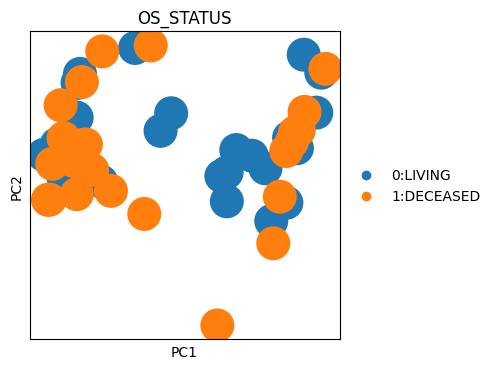
sc.pl.pca(adata, color="OS_STATUS")
Kaplan meier analysis#
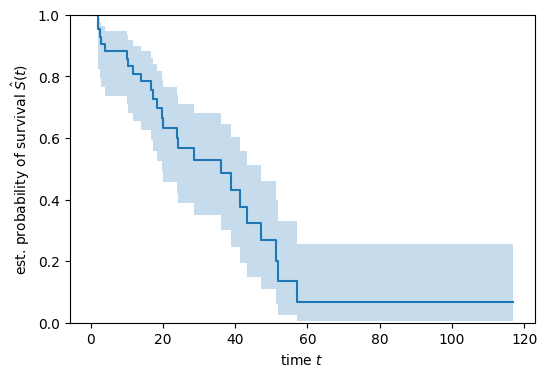
Kaplan-Meier analysis is a non-parametric method used to estimate the survival probability over time, even when some data are censored. You may already saw KM plot in many publications.
In real analysis, you will plot the KM plot for different groups and compare them.
import matplotlib.pyplot as plt

from sksurv.nonparametric import kaplan_meier_estimator

time, survival_prob, conf_int = kaplan_meier_estimator(
    adata.obs["status"], adata.obs["OS_MONTHS"], conf_type="log-log"
)
with plt.rc_context({"figure.figsize": (6, 4)}):
    plt.step(time, survival_prob, where="post")
    plt.fill_between(time, conf_int[0], conf_int[1], alpha=0.25, step="post")
    plt.ylim(0, 1)
    plt.ylabel(r"est. probability of survival $\hat{S}(t)$")
    plt.xlabel("time $t$")
Machine learning model#
Let’s start with a machine learning based model. We used the model from scikit-survival.
The metric we use to evaluate the model is called Concordance Index (cindex).
The concordance index (cindex) is a measure of how well a survival model predicts the order of events. It quantifies the agreement between the predicted risk scores and the actual observed survival times, with a value of 1.0 indicating perfect prediction and 0.5 indicating random chance. A reasonable model performance should have cindex > 0.7.
from sksurv.linear_model import CoxnetSurvivalAnalysis
from sklearn.model_selection import train_test_split
X_train, X_test, y_train, y_test = train_test_split(
    adata.X,
    adata.obs[["status", "OS_MONTHS"]].to_records(index=False),
    test_size=0.2,
    stratify=adata.obs["status"],
    random_state=10,
)

model = CoxnetSurvivalAnalysis(
    l1_ratio=0.9, alpha_min_ratio=0.01, n_alphas=100, fit_baseline_model=True
)
model.fit(X_train, y_train)
s = model.score(X_test, y_test)
print("cindex:", model.score(X_test, y_test))
cindex: 0.6428571428571429
Nerual network#
If you have a lot of data, you can train a neural network to predict the hazard ratio.
Let’s defined a simple models with the input of slide features and output of hazard ratio.
import torch
import torch.nn as nn
import torch.nn.functional as F


# Define a model
class CoxMLP(nn.Module):
    def __init__(self, in_features, hidden_dim=32, dropout=0.3):
        super().__init__()
        self.fc1 = nn.Linear(in_features, hidden_dim)
        self.fc2 = nn.Linear(hidden_dim, hidden_dim)
        self.out = nn.Linear(hidden_dim, 1)  # single risk score

    def forward(self, x):
        x = F.relu(self.fc1(x))
        x = F.relu(self.fc2(x))
        return self.out(x)  # risk score, no activation
X_train, X_test, E_train, E_test, T_train, T_test = train_test_split(
    adata.X,
    adata.obs["status"].to_numpy(),
    adata.obs["OS_MONTHS"].to_numpy(),
    test_size=0.2,
    stratify=adata.obs["status"],
    random_state=10,
)

X_train = torch.tensor(X_train)
X_test = torch.tensor(X_test)
E_train = torch.tensor(E_train)
E_test = torch.tensor(E_test)
T_train = torch.tensor(T_train)
T_test = torch.tensor(T_test)
Here we use the torchsurv package for loss function and cindex calculation.
Here we only use a simple training loop for showcase.
from torchsurv.loss import cox
from torchsurv.metrics.cindex import ConcordanceIndex

# The titan features size is 768
model = CoxMLP(768)
torch.manual_seed(0)

# Trained for 10 epoches
for _ in range(10):
    estimate = model(X_train)
    loss = cox.neg_partial_log_likelihood(estimate, E_train, T_train)
    loss.backward()

# Evaluation
with torch.no_grad():
    log_hz = model(X_test)
    cindex = ConcordanceIndex()
    print(cindex(log_hz, E_test, T_test))
tensor(0.8571, dtype=torch.float64)